Symphony:一份面向 Codex 编排的开源规范
An open-source spec for Codex orchestration: Symphony. 原文发布于
2026 年 4 月 27 日
作者:Alex Kotliarskyi、Victor Zhu、Zach Brock
六个月前,我们团队在做一个内部生产力工具时,作出了一个(在当时看来)颇具争议的决定:仓库里不能有任何人写的代码,项目仓库里的每一行都必须由 Codex 生成。
为了让这件事真正跑起来,我们从零重新设计了工程工作流。我们打造了一个对 agent 友好的仓库,大量投入自动化测试与防护栏,并把 Codex 当作一名正式队员对待。我们在之前那篇 关于 harness engineering 的博客 中记录了这段历程。
这套方法确实奏效,但紧接着我们撞上了下一个瓶颈:上下文切换。
为了解决这个新问题,我们做了一个叫 Symphony 的系统。Symphony(opens in a new window) 是一个 agent 编排器,它把 Linear 这类项目管理看板变成编码 agent 的控制平面。每个未完成的任务都会分配到一个 agent,agent 持续运行,人类来审阅结果。
这篇文章会讲我们是怎么造出 Symphony 的——在一些团队里,它带来了 500% 的 PR 合入量增长——以及如何用它把你自己的 issue tracker 变成一个永不下线的 agent 编排器。
交互式编码 agent 的天花板
即便变得越来越易用,编码 agent——不管是通过 Web 应用还是 CLI 接入——本质上仍是交互式工具。
随着 OpenAI 内部 agentic 工作的规模扩大,我们发现了一种新负担。每个工程师都会打开几个 Codex 会话,分派任务、审阅产物、引导 agent,再循环这套动作。实际操作中,大多数人同时舒服地照看三到五个会话就已经接近极限,再多上下文切换就开始痛苦了,生产力反而下降。我们会忘记哪个会话在做什么,要在终端之间来回跳着把 agent 拉回正轨,还要调试中途卡住的长任务。
agent 是快的,但系统瓶颈出现在另一头:人类注意力。我们等于是组建了一支极强的初级工程师团队,然后又派人类工程师去微观管理他们——这个模式不可能规模化。
视角转换
我们意识到自己优化错了方向。我们把系统设计围绕在编码会话和合并的 PR 上,但 PR 和会话本身只是手段,不是目的。软件工作流主要是围绕交付物来组织的:issue、任务、ticket、里程碑。
于是我们问自己:如果不再直接监督 agent,而是让它们从任务看板上自己拉活儿干,会怎么样?
这个想法变成了 Symphony——一份充当”监工”的书面规范,用来编排 agentic 工作。
把 issue tracker 变成 agent 编排器
Symphony 起步于一个简单的概念:任何打开的任务都应该被一个 agent 接手并完成。我们不再在多个标签页里管理 Codex 会话,而是把 issue tracker 直接当成控制平面。
在这个设置里,每一个开放的 Linear issue 都会映射到一个专属的 agent workspace。Symphony 持续监视任务看板,确保每个活动任务都有一个 agent 在循环里跑,直到事情做完为止。如果某个 agent 崩了或卡住了,Symphony 就重启它;如果有新工作冒出来,Symphony 就把它接走并开始组织工作。
我们围绕 ticket 状态构建工作流,把 Linear 这个任务管理器当作一台状态机。
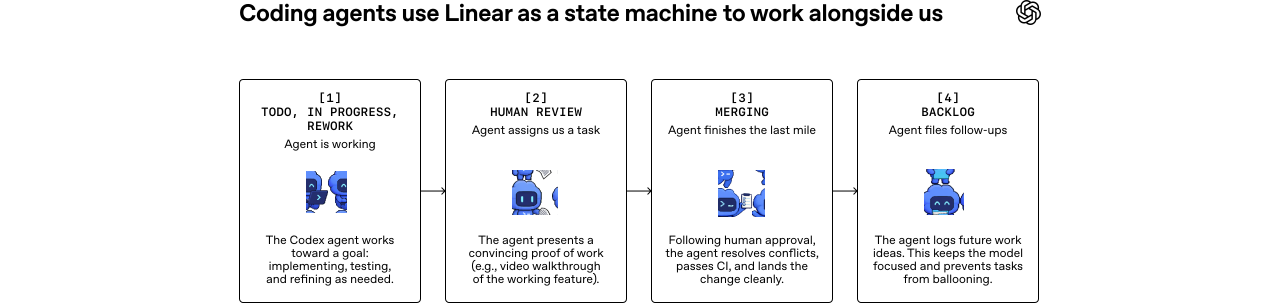
在实际使用中,Symphony 把”工作”和”会话”、“工作”和”PR”解耦开来。一些 issue 会跨多个仓库产出多份 PR;另一些则是纯粹的调研或分析,从头到尾都不会动到代码库。
一旦工作被这样抽象,ticket 就可以表示更大的工作单元。
我们经常用 Symphony 来编排复杂的功能开发和基础设施迁移。比如,我们可以提一个任务,让 agent 去分析代码库、Slack 或 Notion,然后产出一份实施计划。等我们对计划满意了,agent 就会生成一棵任务树,把工作拆成不同阶段并定义任务之间的依赖关系。
agent 只会动手做没被阻塞的任务,所以执行会按这张 DAG(一串执行步骤)自然且最优地并行展开。比如,我们把 React 升级标记为依赖于 Vite 的迁移。正如预期,agent 直到 Vite 迁移完成之后才开始升级 React。
agent 也可以自己创建工作。在实现或评审过程中,它们经常会注意到一些超出当前任务范围的改进点:一个性能问题、一个重构机会、或者一种更好的架构。这种情况下,它们就直接提一个新 issue,留给我们日后评估和排期——其中许多后续任务也会被 agent 接走。我们在一旁监督这个过程,agent 则保持井井有条,让工作持续往前推进。
这种工作方式大幅降低了启动模糊性工作的认知成本。如果 agent 做错了什么,那也是一份有用的信息,对我们来说成本几乎为零。我们可以非常廉价地开 ticket,让 agent 去原型化或探索某个想法,不喜欢的探索结果直接扔掉就行。
由于编排器跑在 devbox 上、永不停歇,我们可以从任何地方提交任务,并且确信会有 agent 接手。比如,我们团队里有一位工程师就从一间网络糟糕的小木屋里,用手机上的 Linear 应用做出了三处重要变更。
这种工作方式带来了更多探索
观察使用 Symphony 之后的效果时,最明显的变化就是产出。在 OpenAI 的一些团队里,前三周合入的 PR 数量增长了 500%。在 OpenAI 之外,Linear 创始人 Karri Saarinen 也在 Symphony 发布时指出了 workspace 创建量的尖峰(opens in a new window)。但更深层的转变其实是团队思考工作的方式。
当工程师不再需要花时间监督 Codex 会话时,代码改动的”经济账”完全变了。每一处改动的感知成本下降了,因为我们不再把人类精力投入到推动具体实现上。
这改变了我们的行为方式。在 Symphony 里启动一个试探性任务变成了一件极其平常的事:试一个想法、探索一次重构、验证一个假设,只保留看起来有戏的结果。
它也拓宽了”谁能发起工作”这件事的边界。我们的产品经理和设计师现在可以直接把功能需求提进 Symphony 里。他们不需要 check out 仓库,也不需要管理 Codex 会话,只要描述清楚功能,就能收到一份评审包,里面甚至包含功能在真实产品里运行的视频走查。
Symphony 在大型 monorepo(比如 OpenAI 这种)中也尤其闪亮,因为在这种仓库里,让一个 PR 真正落地的”最后一公里”往往又慢又脆。系统会盯着 CI,需要时 rebase、解决冲突、重试 flaky 检查,整体上把变更一路护送过流水线。等一张 ticket 走到 Merging 时,我们已经有很高的把握,这次变更不需要人类盯着就能进到主分支。
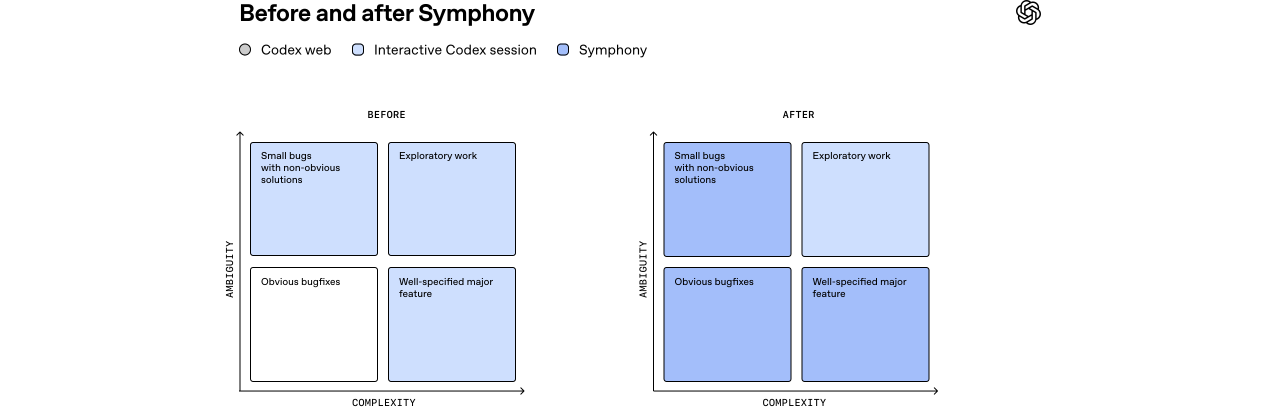
在落地 Symphony 之后,我们把更多工作委托给 agent,把精力集中在更难、更具探索性的任务上。
进步会带来新的、不一样的问题
在这种层级上运作有它的取舍。当我们从交互式地引导 agent 转向以 ticket 粒度分派工作之后,就失去了在中途随时拉一把、必要时纠偏的能力。有时 agent 产出的东西完全跑偏。这反而很有用——那些失败暴露了系统的缺口,帮助我们把它做得更稳健。
我们没有手动去打补丁修结果,而是补上防护栏和技能,好让 agent 下次能成功。久而久之,这就推着我们给 harness 加入了新能力,比如运行端到端测试、用 Chrome DevTools 驱动应用、以及管理 QA 冒烟测试。我们大幅改进了文档,并清楚地定义了”什么算做好”。
并非每种任务都适合 Symphony 这种工作方式。有些问题仍然需要工程师直接和交互式 Codex 会话一起干,特别是那些模糊的问题,或者需要强判断力与专业积累的工作。在实践中,这通常也是工程师最感兴趣、最享受去做的任务。
差别在于,Symphony 可以承担绝大多数常规实现工作,这样工程师就能一次只专注于一个难问题,而不是在一堆小任务之间不停地切换上下文。
我们也认识到,把 agent 当作状态机里僵硬的节点效果并不好。模型在变得更聪明,能解决的问题比我们试图给它套的盒子要大得多。我们 agentic 工作的早期版本只是要求 Codex 去实现任务,事实证明这种做法过于受限。Codex 完全有能力创建多份 PR,也能读评审意见并回应。所以我们给它配了工具——gh CLI、读 CI 日志的技能等等——现在我们可以让 Codex 做更多事,比如关闭旧 PR,或拉取已完成与已放弃工作对照报告。这些任务远远超出了最初那个”功能实现”盒子。
于是我们最终转向给 agent 设定 目标,而不是死板的状态转移,就像一个好经理给下属分派一个目标一样。模型的力量来自它们的推理能力,所以给它们工具和上下文,让它们自己去发挥。
用 Symphony 来打造 Symphony
打开 Symphony 仓库(opens in a new window) 的时候,你会注意到的第一件事是:Symphony 在技术上就只是一个 SPEC.md 文件——一份对问题与预期解的定义。我们没有去搭一套复杂的监督系统,而是把问题和预期解定义清楚,对 agent 做高层引导。
Markdown
# Symphony Service Specification

Status: Draft v1 (language-agnostic)

Purpose: Define a service that orchestrates coding agents to get project work done.

## 1. Problem Statement

Symphony is a long-running automation service that continuously reads work from an issue tracker
(Linear in this specification version), creates an isolated workspace for each issue, and runs a
coding agent session for that issue inside the workspace.

The service solves four operational problems:

- It turns issue execution into a repeatable daemon workflow instead of manual scripts.
- It isolates agent execution in per-issue workspaces so agent commands run only inside per-issue
  workspace directories.
- It keeps the workflow policy in-repo (`WORKFLOW.md`) so teams version the agent prompt and runtime
  settings with their code.
- It provides enough observability to operate and debug multiple concurrent agent runs.

Implementations are expected to document their trust and safety posture explicitly. This
specification does not require a single approval, sandbox, or operator-confirmation policy; some
implementations may target trusted environments with a high-trust configuration, while others may
require stricter approvals or sandboxing.

Important boundary:

- Symphony is a scheduler/runner and tracker reader.
- Ticket writes (state transitions, comments, PR links) are typically performed by the coding agent
  using tools available in the workflow/runtime environment.
- A successful run may end at a workflow-defined handoff state (for example `Human Review`), not
  necessarily `Done`.

## 2. Goals and Non-Goals

### 2.1 Goals

- Poll the issue tracker on a fixed cadence and dispatch work with bounded concurrency.
- Maintain a single authoritative orchestrator state for dispatch, retries, and reconciliation.
- Create deterministic per-issue workspaces and preserve them across runs.
- Stop active runs when issue state changes make them ineligible.
- Recover from transient failures with exponential backoff.
- Load runtime behavior from a repository-owned `WORKFLOW.md` contract.
- Expose operator-visible observability (at minimum structured logs).
- Support restart recovery without requiring a persistent database.

### 2.2 Non-Goals

- Rich web UI or multi-tenant control plane.
- Prescribing a specific dashboard or terminal UI implementation.
- General-purpose workflow engine or distributed job scheduler.
- Built-in business logic for how to edit tickets, PRs, or comments. (That logic lives in the
  workflow prompt and agent tooling.)
- Mandating strong sandbox controls beyond what the coding agent and host OS provide.
- Mandating a single default approval, sandbox, or operator-confirmation posture for all
  implementations.

## 3. System Overview

### 3.1 Main Components

1. `Workflow Loader`
   - Reads `WORKFLOW.md`.
   - Parses YAML front matter and prompt body.
   - Returns `{config, prompt_template}`.

2. `Config Layer`
   - Exposes typed getters for workflow config values.
   - Applies defaults and environment variable indirection.
   - Performs validation used by the orchestrator before dispatch.

3. `Issue Tracker Client`
   - Fetches candidate issues in active states.
   - Fetches current states for specific issue IDs (reconciliation).
   - Fetches terminal-state issues during startup cleanup.
   - Normalizes tracker payloads into a stable issue model.

4. `Orchestrator`
   - Owns the poll tick.
   - Owns the in-memory runtime state.
   - Decides which issues to dispatch, retry, stop, or release.
   - Tracks session metrics and retry queue state.

5. `Workspace Manager`
   - Maps issue identifiers to workspace paths.
   - Ensures per-issue workspace directories exist.
   - Runs workspace lifecycle hooks.
   - Cleans workspaces for terminal issues.

6. `Agent Runner`
   - Creates workspace.
   - Builds prompt from issue + workflow template.
   - Launches the coding agent app-server client.
   - Streams agent updates back to the orchestrator.

7. `Status Surface` (optional)
   - Presents human-readable runtime status (for example terminal output, dashboard, or other
     operator-facing view).

8. `Logging`
   - Emits structured runtime logs to one or more configured sinks.

### 3.2 Abstraction Levels

Symphony is easiest to port when kept in these layers:

1. `Policy Layer` (repo-defined)
   - `WORKFLOW.md` prompt body.
   - Team-specific rules for ticket handling, validation, and handoff.

2. `Configuration Layer` (typed getters)
   - Parses front matter into typed runtime settings.
   - Handles defaults, environment tokens, and path normalization.

3. `Coordination Layer` (orchestrator)
   - Polling loop, issue eligibility, concurrency, retries, reconciliation.

4. `Execution Layer` (workspace + agent subprocess)
   - Filesystem lifecycle, workspace preparation, coding-agent protocol.

5. `Integration Layer` (Linear adapter)
   - API calls and normalization for tracker data.

6. `Observability Layer` (logs + optional status surface)
   - Operator visibility into orchestrator and agent behavior.

### 3.3 External Dependencies

- Issue tracker API (Linear for `tracker.kind: linear` in this specification version).
- Local filesystem for workspaces and logs.
- Optional workspace population tooling (for example Git CLI, if used).
- Coding-agent executable that supports JSON-RPC-like app-server mode over stdio.
- Host environment authentication for the issue tracker and coding agent.

## 4. Core Domain Model

### 4.1 Entities

#### 4.1.1 Issue

Normalized issue record used by orchestration, prompt rendering, and observability output.

Fields:

- `id` (string)
  - Stable tracker-internal ID.
- `identifier` (string)
  - Human-readable ticket key (example: `ABC-123`).
- `title` (string)
- `description` (string or null)
- `priority` (integer or null)
  - Lower numbers are higher priority in dispatch sorting.
- `state` (string)
  - Current tracker state name.
- `branch_name` (string or null)
  - Tracker-provided branch metadata if available.
- `url` (string or null)
- `labels` (list of strings)
  - Normalized to lowercase.
- `blocked_by` (list of blocker refs)
  - Each blocker ref contains:
    - `id` (string or null)
    - `identifier` (string or null)
    - `state` (string or null)
- `created_at` (timestamp or null)
- `updated_at` (timestamp or null)

#### 4.1.2 Workflow Definition

Parsed `WORKFLOW.md` payload:

- `config` (map)
  - YAML front matter root object.
- `prompt_template` (string)
  - Markdown body after front matter, trimmed.

#### 4.1.3 Service Config (Typed View)

Typed runtime values derived from `WorkflowDefinition.config` plus environment resolution.

Examples:

- poll interval
- workspace root
- active and terminal issue states
- concurrency limits
- coding-agent executable/args/timeouts
- workspace hooks

#### 4.1.4 Workspace

Filesystem workspace assigned to one issue identifier.

Fields (logical):

- `path` (workspace path; current runtime typically uses absolute paths, but relative roots are
  possible if configured without path separators)
- `workspace_key` (sanitized issue identifier)
- `created_now` (boolean, used to gate `after_create` hook)

#### 4.1.5 Run Attempt

One execution attempt for one issue.

Fields (logical):

- `issue_id`
- `issue_identifier`
- `attempt` (integer or null, `null` for first run, `>=1` for retries/continuation)
- `workspace_path`
- `started_at`
- `status`
- `error` (optional)

#### 4.1.6 Live Session (Agent Session Metadata)

State tracked while a coding-agent subprocess is running.

Fields:

- `session_id` (string, `<thread_id>-<turn_id>`)
- `thread_id` (string)
- `turn_id` (string)
- `codex_app_server_pid` (string or null)
- `last_codex_event` (string/enum or null)
- `last_codex_timestamp` (timestamp or null)
- `last_codex_message` (summarized payload)
- `codex_input_tokens` (integer)
- `codex_output_tokens` (integer)
- `codex_total_tokens` (integer)
- `last_reported_input_tokens` (integer)
- `last_reported_output_tokens` (integer)
- `last_reported_total_tokens` (integer)
- `turn_count` (integer)
  - Number of coding-agent turns started within the current worker lifetime.

#### 4.1.7 Retry Entry

Scheduled retry state for an issue.

Fields:

- `issue_id`
- `identifier` (best-effort human ID for status surfaces/logs)
- `attempt` (integer, 1-based for retry queue)
- `due_at_ms` (monotonic clock timestamp)
- `timer_handle` (runtime-specific timer reference)
- `error` (string or null)

#### 4.1.8 Orchestrator Runtime State

Single authoritative in-memory state owned by the orchestrator.

Fields:

- `poll_interval_ms` (current effective poll interval)
- `max_concurrent_agents` (current effective global concurrency limit)
- `running` (map `issue_id -> running entry`)
- `claimed` (set of issue IDs reserved/running/retrying)
- `retry_attempts` (map `issue_id -> RetryEntry`)
- `completed` (set of issue IDs; bookkeeping only, not dispatch gating)
- `codex_totals` (aggregate tokens + runtime seconds)
- `codex_rate_limits` (latest rate-limit snapshot from agent events)

### 4.2 Stable Identifiers and Normalization Rules

- `Issue ID`
  - Use for tracker lookups and internal map keys.
- `Issue Identifier`
  - Use for human-readable logs and workspace naming.
- `Workspace Key`
  - Derive from `issue.identifier` by replacing any character not in `[A-Za-z0-9._-]` with `_`.
  - Use the sanitized value for the workspace directory name.
- `Normalized Issue State`
  - Compare states after `lowercase`.
- `Session ID`
  - Compose from coding-agent `thread_id` and `turn_id` as `<thread_id>-<turn_id>`.

## 5. Workflow Specification (Repository Contract)

### 5.1 File Discovery and Path Resolution

Workflow file path precedence:

1. Explicit application/runtime setting (set by CLI startup path).
2. Default: `WORKFLOW.md` in the current process working directory.

Loader behavior:

- If the file cannot be read, return `missing_workflow_file` error.
- The workflow file is expected to be repository-owned and version-controlled.

### 5.2 File Format

`WORKFLOW.md` is a Markdown file with optional YAML front matter.

Design note:

- `WORKFLOW.md` should be self-contained enough to describe and run different workflows (prompt,
  runtime settings, hooks, and tracker selection/config) without requiring out-of-band
  service-specific configuration.

Parsing rules:

- If file starts with `---`, parse lines until the next `---` as YAML front matter.
- Remaining lines become the prompt body.
- If front matter is absent, treat the entire file as prompt body and use an empty config map.
- YAML front matter must decode to a map/object; non-map YAML is an error.
- Prompt body is trimmed before use.

Returned workflow object:

- `config`: front matter root object (not nested under a `config` key).
- `prompt_template`: trimmed Markdown body.

### 5.3 Front Matter Schema

Top-level keys:

- `tracker`
- `polling`
- `workspace`
- `hooks`
- `agent`
- `codex`

Unknown keys should be ignored for forward compatibility.

Note:

- The workflow front matter is extensible. Optional extensions may define additional top-level keys
  (for example `server`) without changing the core schema above.
- Extensions should document their field schema, defaults, validation rules, and whether changes
  apply dynamically or require restart.
- Common extension: `server.port` (integer) enables the optional HTTP server described in Section
  13.7.

#### 5.3.1 `tracker` (object)

Fields:

- `kind` (string)
  - Required for dispatch.
  - Current supported value: `linear`
- `endpoint` (string)
  - Default for `tracker.kind == "linear"`: `https://api.linear.app/graphql`
- `api_key` (string)
  - May be a literal token or `$VAR_NAME`.
  - Canonical environment variable for `tracker.kind == "linear"`: `LINEAR_API_KEY`.
  - If `$VAR_NAME` resolves to an empty string, treat the key as missing.
- `project_slug` (string)
  - Required for dispatch when `tracker.kind == "linear"`.
- `active_states` (list of strings)
  - Default: `Todo`, `In Progress`
- `terminal_states` (list of strings)
  - Default: `Closed`, `Cancelled`, `Canceled`, `Duplicate`, `Done`

#### 5.3.2 `polling` (object)

Fields:

- `interval_ms` (integer or string integer)
  - Default: `30000`
  - Changes should be re-applied at runtime and affect future tick scheduling without restart.

#### 5.3.3 `workspace` (object)

Fields:

- `root` (path string or `$VAR`)
  - Default: `<system-temp>/symphony_workspaces`
  - `~` and strings containing path separators are expanded.
  - Bare strings without path separators are preserved as-is (relative roots are allowed but
    discouraged).

#### 5.3.4 `hooks` (object)

Fields:

- `after_create` (multiline shell script string, optional)
  - Runs only when a workspace directory is newly created.
  - Failure aborts workspace creation.
- `before_run` (multiline shell script string, optional)
  - Runs before each agent attempt after workspace preparation and before launching the coding
    agent.
  - Failure aborts the current attempt.
- `after_run` (multiline shell script string, optional)
  - Runs after each agent attempt (success, failure, timeout, or cancellation) once the workspace
    exists.
  - Failure is logged but ignored.
- `before_remove` (multiline shell script string, optional)
  - Runs before workspace deletion if the directory exists.
  - Failure is logged but ignored; cleanup still proceeds.
- `timeout_ms` (integer, optional)
  - Default: `60000`
  - Applies to all workspace hooks.
  - Non-positive values should be treated as invalid and fall back to the default.
  - Changes should be re-applied at runtime for future hook executions.

#### 5.3.5 `agent` (object)

Fields:

- `max_concurrent_agents` (integer or string integer)
  - Default: `10`
  - Changes should be re-applied at runtime and affect subsequent dispatch decisions.
- `max_retry_backoff_ms` (integer or string integer)
  - Default: `300000` (5 minutes)
  - Changes should be re-applied at runtime and affect future retry scheduling.
- `max_concurrent_agents_by_state` (map `state_name -> positive integer`)
  - Default: empty map.
  - State keys are normalized (`lowercase`) for lookup.
  - Invalid entries (non-positive or non-numeric) are ignored.

#### 5.3.6 `codex` (object)

Fields:

For Codex-owned config values such as `approval_policy`, `thread_sandbox`, and
`turn_sandbox_policy`, supported values are defined by the targeted Codex app-server version.
Implementors should treat them as pass-through Codex config values rather than relying on a
hand-maintained enum in this spec. To inspect the installed Codex schema, run
`codex app-server generate-json-schema --out <dir>` and inspect the relevant definitions referenced
by `v2/ThreadStartParams.json` and `v2/TurnStartParams.json`. Implementations may validate these
fields locally if they want stricter startup checks.

- `command` (string shell command)
  - Default: `codex app-server`
  - The runtime launches this command via `bash -lc` in the workspace directory.
  - The launched process must speak a compatible app-server protocol over stdio.
- `approval_policy` (Codex `AskForApproval` value)
  - Default: implementation-defined.
- `thread_sandbox` (Codex `SandboxMode` value)
  - Default: implementation-defined.
- `turn_sandbox_policy` (Codex `SandboxPolicy` value)
  - Default: implementation-defined.
- `turn_timeout_ms` (integer)
  - Default: `3600000` (1 hour)
- `read_timeout_ms` (integer)
  - Default: `5000`
- `stall_timeout_ms` (integer)
  - Default: `300000` (5 minutes)
  - If `<= 0`, stall detection is disabled.

### 5.4 Prompt Template Contract

The Markdown body of `WORKFLOW.md` is the per-issue prompt template.

Rendering requirements:

- Use a strict template engine (Liquid-compatible semantics are sufficient).
- Unknown variables must fail rendering.
- Unknown filters must fail rendering.

Template input variables:

- `issue` (object)
  - Includes all normalized issue fields, including labels and blockers.
- `attempt` (integer or null)
  - `null`/absent on first attempt.
  - Integer on retry or continuation run.

Fallback prompt behavior:

- If the workflow prompt body is empty, the runtime may use a minimal default prompt
  (`You are working on an issue from Linear.`).
- Workflow file read/parse failures are configuration/validation errors and should not silently fall
  back to a prompt.

### 5.5 Workflow Validation and Error Surface

Error classes:

- `missing_workflow_file`
- `workflow_parse_error`
- `workflow_front_matter_not_a_map`
- `template_parse_error` (during prompt rendering)
- `template_render_error` (unknown variable/filter, invalid interpolation)

Dispatch gating behavior:

- Workflow file read/YAML errors block new dispatches until fixed.
- Template errors fail only the affected run attempt.

## 6. Configuration Specification

### 6.1 Source Precedence and Resolution Semantics

Configuration precedence:

1. Workflow file path selection (runtime setting -> cwd default).
2. YAML front matter values.
3. Environment indirection via `$VAR_NAME` inside selected YAML values.
4. Built-in defaults.

Value coercion semantics:

- Path/command fields support:
  - `~` home expansion
  - `$VAR` expansion for env-backed path values
  - Apply expansion only to values intended to be local filesystem paths; do not rewrite URIs or
    arbitrary shell command strings.

### 6.2 Dynamic Reload Semantics

Dynamic reload is required:

- The software should watch `WORKFLOW.md` for changes.
- On change, it should re-read and re-apply workflow config and prompt template without restart.
- The software should attempt to adjust live behavior to the new config (for example polling
  cadence, concurrency limits, active/terminal states, codex settings, workspace paths/hooks, and
  prompt content for future runs).
- Reloaded config applies to future dispatch, retry scheduling, reconciliation decisions, hook
  execution, and agent launches.
- Implementations are not required to restart in-flight agent sessions automatically when config
  changes.
- Extensions that manage their own listeners/resources (for example an HTTP server port change) may
  require restart unless the implementation explicitly supports live rebind.
- Implementations should also re-validate/reload defensively during runtime operations (for example
  before dispatch) in case filesystem watch events are missed.
- Invalid reloads should not crash the service; keep operating with the last known good effective
  configuration and emit an operator-visible error.

### 6.3 Dispatch Preflight Validation

This validation is a scheduler preflight run before attempting to dispatch new work. It validates
the workflow/config needed to poll and launch workers, not a full audit of all possible workflow
behavior.

Startup validation:

- Validate configuration before starting the scheduling loop.
- If startup validation fails, fail startup and emit an operator-visible error.

Per-tick dispatch validation:

- Re-validate before each dispatch cycle.
- If validation fails, skip dispatch for that tick, keep reconciliation active, and emit an
  operator-visible error.

Validation checks:

- Workflow file can be loaded and parsed.
- `tracker.kind` is present and supported.
- `tracker.api_key` is present after `---
title: "An open-source spec for Codex orchestration: Symphony."
date: 2026-05-12
sourceUrl: https://openai.com/index/open-source-codex-orchestration-symphony/
---
 resolution.
- `tracker.project_slug` is present when required by the selected tracker kind.
- `codex.command` is present and non-empty.

### 6.4 Config Fields Summary (Cheat Sheet)

This section is intentionally redundant so a coding agent can implement the config layer quickly.

- `tracker.kind`: string, required, currently `linear`
- `tracker.endpoint`: string, default `https://api.linear.app/graphql` when `tracker.kind=linear`
- `tracker.api_key`: string or `$VAR`, canonical env `LINEAR_API_KEY` when `tracker.kind=linear`
- `tracker.project_slug`: string, required when `tracker.kind=linear`
- `tracker.active_states`: list of strings, default `["Todo", "In Progress"]`
- `tracker.terminal_states`: list of strings, default `["Closed", "Cancelled", "Canceled", "Duplicate", "Done"]`
- `polling.interval_ms`: integer, default `30000`
- `workspace.root`: path, default `<system-temp>/symphony_workspaces`
- `worker.ssh_hosts` (extension): list of SSH host strings, optional; when omitted, work runs
  locally
- `worker.max_concurrent_agents_per_host` (extension): positive integer, optional; shared per-host
  cap applied across configured SSH hosts
- `hooks.after_create`: shell script or null
- `hooks.before_run`: shell script or null
- `hooks.after_run`: shell script or null
- `hooks.before_remove`: shell script or null
- `hooks.timeout_ms`: integer, default `60000`
- `agent.max_concurrent_agents`: integer, default `10`
- `agent.max_turns`: integer, default `20`
- `agent.max_retry_backoff_ms`: integer, default `300000` (5m)
- `agent.max_concurrent_agents_by_state`: map of positive integers, default `{}`
- `codex.command`: shell command string, default `codex app-server`
- `codex.approval_policy`: Codex `AskForApproval` value, default implementation-defined
- `codex.thread_sandbox`: Codex `SandboxMode` value, default implementation-defined
- `codex.turn_sandbox_policy`: Codex `SandboxPolicy` value, default implementation-defined
- `codex.turn_timeout_ms`: integer, default `3600000`
- `codex.read_timeout_ms`: integer, default `5000`
- `codex.stall_timeout_ms`: integer, default `300000`
- `server.port` (extension): integer, optional; enables the optional HTTP server, `0` may be used
  for ephemeral local bind, and CLI `--port` overrides it

## 7. Orchestration State Machine

The orchestrator is the only component that mutates scheduling state. All worker outcomes are
reported back to it and converted into explicit state transitions.

### 7.1 Issue Orchestration States

This is not the same as tracker states (`Todo`, `In Progress`, etc.). This is the service's internal
claim state.

1. `Unclaimed`
   - Issue is not running and has no retry scheduled.

2. `Claimed`
   - Orchestrator has reserved the issue to prevent duplicate dispatch.
   - In practice, claimed issues are either `Running` or `RetryQueued`.

3. `Running`
   - Worker task exists and the issue is tracked in `running` map.

4. `RetryQueued`
   - Worker is not running, but a retry timer exists in `retry_attempts`.

5. `Released`
   - Claim removed because issue is terminal, non-active, missing, or retry path completed without
     re-dispatch.

Important nuance:

- A successful worker exit does not mean the issue is done forever.
- The worker may continue through multiple back-to-back coding-agent turns before it exits.
- After each normal turn completion, the worker re-checks the tracker issue state.
- If the issue is still in an active state, the worker should start another turn on the same live
  coding-agent thread in the same workspace, up to `agent.max_turns`.
- The first turn should use the full rendered task prompt.
- Continuation turns should send only continuation guidance to the existing thread, not resend the
  original task prompt that is already present in thread history.
- Once the worker exits normally, the orchestrator still schedules a short continuation retry
  (about 1 second) so it can re-check whether the issue remains active and needs another worker
  session.

### 7.2 Run Attempt Lifecycle

A run attempt transitions through these phases:

1. `PreparingWorkspace`
2. `BuildingPrompt`
3. `LaunchingAgentProcess`
4. `InitializingSession`
5. `StreamingTurn`
6. `Finishing`
7. `Succeeded`
8. `Failed`
9. `TimedOut`
10. `Stalled`
11. `CanceledByReconciliation`

Distinct terminal reasons are important because retry logic and logs differ.

### 7.3 Transition Triggers

- `Poll Tick`
  - Reconcile active runs.
  - Validate config.
  - Fetch candidate issues.
  - Dispatch until slots are exhausted.

- `Worker Exit (normal)`
  - Remove running entry.
  - Update aggregate runtime totals.
  - Schedule continuation retry (attempt `1`) after the worker exhausts or finishes its in-process
    turn loop.

- `Worker Exit (abnormal)`
  - Remove running entry.
  - Update aggregate runtime totals.
  - Schedule exponential-backoff retry.

- `Codex Update Event`
  - Update live session fields, token counters, and rate limits.

- `Retry Timer Fired`
  - Re-fetch active candidates and attempt re-dispatch, or release claim if no longer eligible.

- `Reconciliation State Refresh`
  - Stop runs whose issue states are terminal or no longer active.

- `Stall Timeout`
  - Kill worker and schedule retry.

### 7.4 Idempotency and Recovery Rules

- The orchestrator serializes state mutations through one authority to avoid duplicate dispatch.
- `claimed` and `running` checks are required before launching any worker.
- Reconciliation runs before dispatch on every tick.
- Restart recovery is tracker-driven and filesystem-driven (no durable orchestrator DB required).
- Startup terminal cleanup removes stale workspaces for issues already in terminal states.

## 8. Polling, Scheduling, and Reconciliation

### 8.1 Poll Loop

At startup, the service validates config, performs startup cleanup, schedules an immediate tick, and
then repeats every `polling.interval_ms`.

The effective poll interval should be updated when workflow config changes are re-applied.

Tick sequence:

1. Reconcile running issues.
2. Run dispatch preflight validation.
3. Fetch candidate issues from tracker using active states.
4. Sort issues by dispatch priority.
5. Dispatch eligible issues while slots remain.
6. Notify observability/status consumers of state changes.

If per-tick validation fails, dispatch is skipped for that tick, but reconciliation still happens
first.

### 8.2 Candidate Selection Rules

An issue is dispatch-eligible only if all are true:

- It has `id`, `identifier`, `title`, and `state`.
- Its state is in `active_states` and not in `terminal_states`.
- It is not already in `running`.
- It is not already in `claimed`.
- Global concurrency slots are available.
- Per-state concurrency slots are available.
- Blocker rule for `Todo` state passes:
  - If the issue state is `Todo`, do not dispatch when any blocker is non-terminal.

Sorting order (stable intent):

1. `priority` ascending (1..4 are preferred; null/unknown sorts last)
2. `created_at` oldest first
3. `identifier` lexicographic tie-breaker

### 8.3 Concurrency Control

Global limit:

- `available_slots = max(max_concurrent_agents - running_count, 0)`

Per-state limit:

- `max_concurrent_agents_by_state[state]` if present (state key normalized)
- otherwise fallback to global limit

The runtime counts issues by their current tracked state in the `running` map.

Optional SSH host limit:

- When `worker.max_concurrent_agents_per_host` is set, each configured SSH host may run at most
  that many concurrent agents at once.
- Hosts at that cap are skipped for new dispatch until capacity frees up.

### 8.4 Retry and Backoff

Retry entry creation:

- Cancel any existing retry timer for the same issue.
- Store `attempt`, `identifier`, `error`, `due_at_ms`, and new timer handle.

Backoff formula:

- Normal continuation retries after a clean worker exit use a short fixed delay of `1000` ms.
- Failure-driven retries use `delay = min(10000 * 2^(attempt - 1), agent.max_retry_backoff_ms)`.
- Power is capped by the configured max retry backoff (default `300000` / 5m).

Retry handling behavior:

1. Fetch active candidate issues (not all issues).
2. Find the specific issue by `issue_id`.
3. If not found, release claim.
4. If found and still candidate-eligible:
   - Dispatch if slots are available.
   - Otherwise requeue with error `no available orchestrator slots`.
5. If found but no longer active, release claim.

Note:

- Terminal-state workspace cleanup is handled by startup cleanup and active-run reconciliation
  (including terminal transitions for currently running issues).
- Retry handling mainly operates on active candidates and releases claims when the issue is absent,
  rather than performing terminal cleanup itself.

### 8.5 Active Run Reconciliation

Reconciliation runs every tick and has two parts.

Part A: Stall detection

- For each running issue, compute `elapsed_ms` since:
  - `last_codex_timestamp` if any event has been seen, else
  - `started_at`
- If `elapsed_ms > codex.stall_timeout_ms`, terminate the worker and queue a retry.
- If `stall_timeout_ms <= 0`, skip stall detection entirely.

Part B: Tracker state refresh

- Fetch current issue states for all running issue IDs.
- For each running issue:
  - If tracker state is terminal: terminate worker and clean workspace.
  - If tracker state is still active: update the in-memory issue snapshot.
  - If tracker state is neither active nor terminal: terminate worker without workspace cleanup.
- If state refresh fails, keep workers running and try again on the next tick.

### 8.6 Startup Terminal Workspace Cleanup

When the service starts:

1. Query tracker for issues in terminal states.
2. For each returned issue identifier, remove the corresponding workspace directory.
3. If the terminal-issues fetch fails, log a warning and continue startup.

This prevents stale terminal workspaces from accumulating after restarts.

## 9. Workspace Management and Safety

### 9.1 Workspace Layout

Workspace root:

- `workspace.root` (normalized path; the current config layer expands path-like values and preserves
  bare relative names)

Per-issue workspace path:

- `<workspace.root>/<sanitized_issue_identifier>`

Workspace persistence:

- Workspaces are reused across runs for the same issue.
- Successful runs do not auto-delete workspaces.

### 9.2 Workspace Creation and Reuse

Input: `issue.identifier`

Algorithm summary:

1. Sanitize identifier to `workspace_key`.
2. Compute workspace path under workspace root.
3. Ensure the workspace path exists as a directory.
4. Mark `created_now=true` only if the directory was created during this call; otherwise
   `created_now=false`.
5. If `created_now=true`, run `after_create` hook if configured.

Notes:

- This section does not assume any specific repository/VCS workflow.
- Workspace preparation beyond directory creation (for example dependency bootstrap, checkout/sync,
  code generation) is implementation-defined and is typically handled via hooks.

### 9.3 Optional Workspace Population (Implementation-Defined)

The spec does not require any built-in VCS or repository bootstrap behavior.

Implementations may populate or synchronize the workspace using implementation-defined logic and/or
hooks (for example `after_create` and/or `before_run`).

Failure handling:

- Workspace population/synchronization failures return an error for the current attempt.
- If failure happens while creating a brand-new workspace, implementations may remove the partially
  prepared directory.
- Reused workspaces should not be destructively reset on population failure unless that policy is
  explicitly chosen and documented.

### 9.4 Workspace Hooks

Supported hooks:

- `hooks.after_create`
- `hooks.before_run`
- `hooks.after_run`
- `hooks.before_remove`

Execution contract:

- Execute in a local shell context appropriate to the host OS, with the workspace directory as
  `cwd`.
- On POSIX systems, `sh -lc <script>` (or a stricter equivalent such as `bash -lc <script>`) is a
  conforming default.
- Hook timeout uses `hooks.timeout_ms`; default: `60000 ms`.
- Log hook start, failures, and timeouts.

Failure semantics:

- `after_create` failure or timeout is fatal to workspace creation.
- `before_run` failure or timeout is fatal to the current run attempt.
- `after_run` failure or timeout is logged and ignored.
- `before_remove` failure or timeout is logged and ignored.

### 9.5 Safety Invariants

This is the most important portability constraint.

Invariant 1: Run the coding agent only in the per-issue workspace path.

- Before launching the coding-agent subprocess, validate:
  - `cwd == workspace_path`

Invariant 2: Workspace path must stay inside workspace root.

- Normalize both paths to absolute.
- Require `workspace_path` to have `workspace_root` as a prefix directory.
- Reject any path outside the workspace root.

Invariant 3: Workspace key is sanitized.

- Only `[A-Za-z0-9._-]` allowed in workspace directory names.
- Replace all other characters with `_`.

## 10. Agent Runner Protocol (Coding Agent Integration)

This section defines the language-neutral contract for integrating a coding agent app-server.

Compatibility profile:

- The normative contract is message ordering, required behaviors, and the logical fields that must
  be extracted (for example session IDs, completion state, approval handling, and usage/rate-limit
  telemetry).
- Exact JSON field names may vary slightly across compatible app-server versions.
- Implementations should tolerate equivalent payload shapes when they carry the same logical
  meaning, especially for nested IDs, approval requests, user-input-required signals, and
  token/rate-limit metadata.

### 10.1 Launch Contract

Subprocess launch parameters:

- Command: `codex.command`
- Invocation: `bash -lc <codex.command>`
- Working directory: workspace path
- Stdout/stderr: separate streams
- Framing: line-delimited protocol messages on stdout (JSON-RPC-like JSON per line)

Notes:

- The default command is `codex app-server`.
- Approval policy, cwd, and prompt are expressed in the protocol messages in Section 10.2.

Recommended additional process settings:

- Max line size: 10 MB (for safe buffering)

### 10.2 Session Startup Handshake

Reference: https://developers.openai.com/codex/app-server/

The client must send these protocol messages in order:

Illustrative startup transcript (equivalent payload shapes are acceptable if they preserve the same
semantics):

```json
{"id":1,"method":"initialize","params":{"clientInfo":{"name":"symphony","version":"1.0"},"capabilities":{}}}
{"method":"initialized","params":{}}
{"id":2,"method":"thread/start","params":{"approvalPolicy":"<implementation-defined>","sandbox":"<implementation-defined>","cwd":"/abs/workspace"}}
{"id":3,"method":"turn/start","params":{"threadId":"<thread-id>","input":[{"type":"text","text":"<rendered prompt-or-continuation-guidance>"}],"cwd":"/abs/workspace","title":"ABC-123: Example","approvalPolicy":"<implementation-defined>","sandboxPolicy":{"type":"<implementation-defined>"}}}
```

1. `initialize` request
   - Params include:
     - `clientInfo` object (for example `{name, version}`)
     - `capabilities` object (may be empty)
   - If the targeted Codex app-server requires capability negotiation for dynamic tools, include the
     necessary capability flag(s) here.
   - Wait for response (`read_timeout_ms`)
2. `initialized` notification
3. `thread/start` request
   - Params include:
     - `approvalPolicy` = implementation-defined session approval policy value
     - `sandbox` = implementation-defined session sandbox value
     - `cwd` = absolute workspace path
     - If optional client-side tools are implemented, include their advertised tool specs using the
       protocol mechanism supported by the targeted Codex app-server version.
4. `turn/start` request
   - Params include:
     - `threadId`
     - `input` = single text item containing rendered prompt for the first turn, or continuation
       guidance for later turns on the same thread
     - `cwd`
     - `title` = `<issue.identifier>: <issue.title>`
     - `approvalPolicy` = implementation-defined turn approval policy value
     - `sandboxPolicy` = implementation-defined object-form sandbox policy payload when required by
       the targeted app-server version

Session identifiers:

- Read `thread_id` from `thread/start` result `result.thread.id`
- Read `turn_id` from each `turn/start` result `result.turn.id`
- Emit `session_id = "<thread_id>-<turn_id>"`
- Reuse the same `thread_id` for all continuation turns inside one worker run

### 10.3 Streaming Turn Processing

The client reads line-delimited messages until the turn terminates.

Completion conditions:

- `turn/completed` -> success
- `turn/failed` -> failure
- `turn/cancelled` -> failure
- turn timeout (`turn_timeout_ms`) -> failure
- subprocess exit -> failure

Continuation processing:

- If the worker decides to continue after a successful turn, it should issue another `turn/start`
  on the same live `threadId`.
- The app-server subprocess should remain alive across those continuation turns and be stopped only
  when the worker run is ending.

Line handling requirements:

- Read protocol messages from stdout only.
- Buffer partial stdout lines until newline arrives.
- Attempt JSON parse on complete stdout lines.
- Stderr is not part of the protocol stream:
  - ignore it or log it as diagnostics
  - do not attempt protocol JSON parsing on stderr

### 10.4 Emitted Runtime Events (Upstream to Orchestrator)

The app-server client emits structured events to the orchestrator callback. Each event should
include:

- `event` (enum/string)
- `timestamp` (UTC timestamp)
- `codex_app_server_pid` (if available)
- optional `usage` map (token counts)
- payload fields as needed

Important emitted events may include:

- `session_started`
- `startup_failed`
- `turn_completed`
- `turn_failed`
- `turn_cancelled`
- `turn_ended_with_error`
- `turn_input_required`
- `approval_auto_approved`
- `unsupported_tool_call`
- `notification`
- `other_message`
- `malformed`

### 10.5 Approval, Tool Calls, and User Input Policy

Approval, sandbox, and user-input behavior is implementation-defined.

Policy requirements:

- Each implementation should document its chosen approval, sandbox, and operator-confirmation
  posture.
- Approval requests and user-input-required events must not leave a run stalled indefinitely. An
  implementation should either satisfy them, surface them to an operator, auto-resolve them, or
  fail the run according to its documented policy.

Example high-trust behavior:

- Auto-approve command execution approvals for the session.
- Auto-approve file-change approvals for the session.
- Treat user-input-required turns as hard failure.

Unsupported dynamic tool calls:

- Supported dynamic tool calls that are explicitly implemented and advertised by the runtime should
  be handled according to their extension contract.
- If the agent requests a dynamic tool call (`item/tool/call`) that is not supported, return a tool
  failure response and continue the session.
- This prevents the session from stalling on unsupported tool execution paths.

Optional client-side tool extension:

- An implementation may expose a limited set of client-side tools to the app-server session.
- Current optional standardized tool: `linear_graphql`.
- If implemented, supported tools should be advertised to the app-server session during startup
  using the protocol mechanism supported by the targeted Codex app-server version.
- Unsupported tool names should still return a failure result and continue the session.

`linear_graphql` extension contract:

- Purpose: execute a raw GraphQL query or mutation against Linear using Symphony's configured
  tracker auth for the current session.
- Availability: only meaningful when `tracker.kind == "linear"` and valid Linear auth is configured.
- Preferred input shape:

  ```json
  {
    "query": "single GraphQL query or mutation document",
    "variables": {
      "optional": "graphql variables object"
    }
  }
  ```

- `query` must be a non-empty string.
- `query` must contain exactly one GraphQL operation.
- `variables` is optional and, when present, must be a JSON object.
- Implementations may additionally accept a raw GraphQL query string as shorthand input.
- Execute one GraphQL operation per tool call.
- If the provided document contains multiple operations, reject the tool call as invalid input.
- `operationName` selection is intentionally out of scope for this extension.
- Reuse the configured Linear endpoint and auth from the active Symphony workflow/runtime config; do
  not require the coding agent to read raw tokens from disk.
- Tool result semantics:
  - transport success + no top-level GraphQL `errors` -> `success=true`
  - top-level GraphQL `errors` present -> `success=false`, but preserve the GraphQL response body
    for debugging
  - invalid input, missing auth, or transport failure -> `success=false` with an error payload
- Return the GraphQL response or error payload as structured tool output that the model can inspect
  in-session.

Illustrative responses (equivalent payload shapes are acceptable if they preserve the same outcome):

```json
{"id":"<approval-id>","result":{"approved":true}}
{"id":"<tool-call-id>","result":{"success":false,"error":"unsupported_tool_call"}}
```

Hard failure on user input requirement:

- If the agent requests user input, fail the run attempt immediately.
- The client detects this via:
  - explicit method (`item/tool/requestUserInput`), or
  - turn methods/flags indicating input is required.

### 10.6 Timeouts and Error Mapping

Timeouts:

- `codex.read_timeout_ms`: request/response timeout during startup and sync requests
- `codex.turn_timeout_ms`: total turn stream timeout
- `codex.stall_timeout_ms`: enforced by orchestrator based on event inactivity

Error mapping (recommended normalized categories):

- `codex_not_found`
- `invalid_workspace_cwd`
- `response_timeout`
- `turn_timeout`
- `port_exit`
- `response_error`
- `turn_failed`
- `turn_cancelled`
- `turn_input_required`

### 10.7 Agent Runner Contract

The `Agent Runner` wraps workspace + prompt + app-server client.

Behavior:

1. Create/reuse workspace for issue.
2. Build prompt from workflow template.
3. Start app-server session.
4. Forward app-server events to orchestrator.
5. On any error, fail the worker attempt (the orchestrator will retry).

Note:

- Workspaces are intentionally preserved after successful runs.

## 11. Issue Tracker Integration Contract (Linear-Compatible)

### 11.1 Required Operations

An implementation must support these tracker adapter operations:

1. `fetch_candidate_issues()`
   - Return issues in configured active states for a configured project.

2. `fetch_issues_by_states(state_names)`
   - Used for startup terminal cleanup.

3. `fetch_issue_states_by_ids(issue_ids)`
   - Used for active-run reconciliation.

### 11.2 Query Semantics (Linear)

Linear-specific requirements for `tracker.kind == "linear"`:

- `tracker.kind == "linear"`
- GraphQL endpoint (default `https://api.linear.app/graphql`)
- Auth token sent in `Authorization` header
- `tracker.project_slug` maps to Linear project `slugId`
- Candidate issue query filters project using `project: { slugId: { eq: $projectSlug } }`
- Issue-state refresh query uses GraphQL issue IDs with variable type `[ID!]`
- Pagination required for candidate issues
- Page size default: `50`
- Network timeout: `30000 ms`

Important:

- Linear GraphQL schema details can drift. Keep query construction isolated and test the exact query
  fields/types required by this specification.

A non-Linear implementation may change transport details, but the normalized outputs must match the
domain model in Section 4.

### 11.3 Normalization Rules

Candidate issue normalization should produce fields listed in Section 4.1.1.

Additional normalization details:

- `labels` -> lowercase strings
- `blocked_by` -> derived from inverse relations where relation type is `blocks`
- `priority` -> integer only (non-integers become null)
- `created_at` and `updated_at` -> parse ISO-8601 timestamps

### 11.4 Error Handling Contract

Recommended error categories:

- `unsupported_tracker_kind`
- `missing_tracker_api_key`
- `missing_tracker_project_slug`
- `linear_api_request` (transport failures)
- `linear_api_status` (non-200 HTTP)
- `linear_graphql_errors`
- `linear_unknown_payload`
- `linear_missing_end_cursor` (pagination integrity error)

Orchestrator behavior on tracker errors:

- Candidate fetch failure: log and skip dispatch for this tick.
- Running-state refresh failure: log and keep active workers running.
- Startup terminal cleanup failure: log warning and continue startup.

### 11.5 Tracker Writes (Important Boundary)

Symphony does not require first-class tracker write APIs in the orchestrator.

- Ticket mutations (state transitions, comments, PR metadata) are typically handled by the coding
  agent using tools defined by the workflow prompt.
- The service remains a scheduler/runner and tracker reader.
- Workflow-specific success often means "reached the next handoff state" (for example
  `Human Review`) rather than tracker terminal state `Done`.
- If the optional `linear_graphql` client-side tool extension is implemented, it is still part of
  the agent toolchain rather than orchestrator business logic.

## 12. Prompt Construction and Context Assembly

### 12.1 Inputs

Inputs to prompt rendering:

- `workflow.prompt_template`
- normalized `issue` object
- optional `attempt` integer (retry/continuation metadata)

### 12.2 Rendering Rules

- Render with strict variable checking.
- Render with strict filter checking.
- Convert issue object keys to strings for template compatibility.
- Preserve nested arrays/maps (labels, blockers) so templates can iterate.

### 12.3 Retry/Continuation Semantics

`attempt` should be passed to the template because the workflow prompt may provide different
instructions for:

- first run (`attempt` null or absent)
- continuation run after a successful prior session
- retry after error/timeout/stall

### 12.4 Failure Semantics

If prompt rendering fails:

- Fail the run attempt immediately.
- Let the orchestrator treat it like any other worker failure and decide retry behavior.

## 13. Logging, Status, and Observability

### 13.1 Logging Conventions

Required context fields for issue-related logs:

- `issue_id`
- `issue_identifier`

Required context for coding-agent session lifecycle logs:

- `session_id`

Message formatting requirements:

- Use stable `key=value` phrasing.
- Include action outcome (`completed`, `failed`, `retrying`, etc.).
- Include concise failure reason when present.
- Avoid logging large raw payloads unless necessary.

### 13.2 Logging Outputs and Sinks

The spec does not prescribe where logs must go (stderr, file, remote sink, etc.).

Requirements:

- Operators must be able to see startup/validation/dispatch failures without attaching a debugger.
- Implementations may write to one or more sinks.
- If a configured log sink fails, the service should continue running when possible and emit an
  operator-visible warning through any remaining sink.

### 13.3 Runtime Snapshot / Monitoring Interface (Optional but Recommended)

If the implementation exposes a synchronous runtime snapshot (for dashboards or monitoring), it
should return:

- `running` (list of running session rows)
- each running row should include `turn_count`
- `retrying` (list of retry queue rows)
- `codex_totals`
  - `input_tokens`
  - `output_tokens`
  - `total_tokens`
  - `seconds_running` (aggregate runtime seconds as of snapshot time, including active sessions)
- `rate_limits` (latest coding-agent rate limit payload, if available)

Recommended snapshot error modes:

- `timeout`
- `unavailable`

### 13.4 Optional Human-Readable Status Surface

A human-readable status surface (terminal output, dashboard, etc.) is optional and
implementation-defined.

If present, it should draw from orchestrator state/metrics only and must not be required for
correctness.

### 13.5 Session Metrics and Token Accounting

Token accounting rules:

- Agent events may include token counts in multiple payload shapes.
- Prefer absolute thread totals when available, such as:
  - `thread/tokenUsage/updated` payloads
  - `total_token_usage` within token-count wrapper events
- Ignore delta-style payloads such as `last_token_usage` for dashboard/API totals.
- Extract input/output/total token counts leniently from common field names within the selected
  payload.
- For absolute totals, track deltas relative to last reported totals to avoid double-counting.
- Do not treat generic `usage` maps as cumulative totals unless the event type defines them that
  way.
- Accumulate aggregate totals in orchestrator state.

Runtime accounting:

- Runtime should be reported as a live aggregate at snapshot/render time.
- Implementations may maintain a cumulative counter for ended sessions and add active-session
  elapsed time derived from `running` entries (for example `started_at`) when producing a
  snapshot/status view.
- Add run duration seconds to the cumulative ended-session runtime when a session ends (normal exit
  or cancellation/termination).
- Continuous background ticking of runtime totals is not required.

Rate-limit tracking:

- Track the latest rate-limit payload seen in any agent update.
- Any human-readable presentation of rate-limit data is implementation-defined.

### 13.6 Humanized Agent Event Summaries (Optional)

Humanized summaries of raw agent protocol events are optional.

If implemented:

- Treat them as observability-only output.
- Do not make orchestrator logic depend on humanized strings.
参考实现是用 Elixir 写的——当代码的边际成本几乎为零时,你终于可以根据语言自身的长处来挑选它,比如 Elixir 的并发能力——但核心思想可以用一份简单的 Markdown 文档表达出来。我们鼓励你把这份规范丢给你最爱的编码 agent,让它去实现自己的版本。
Symphony 的第一版只是一个在 tmux 里运行的 Codex 会话,轮询 Linear 并为新任务派生子 agent。它能跑,但并不算特别可靠。第二版住进了我们项目的主仓库,而那个仓库一开始就是面向 agent 设计的。我们之前已经构建了 agent harness,赋予 agent 在这个仓库里产出高质量工作所需的技能和上下文,所以 Symphony 不过是把这一切串联起来。
一旦基本功能成立,我们就开始用 Symphony 来打造 Symphony。
当我们在内部演示这套系统是怎样管理任务并附上工作证明视频时,反响异常正面:我们的 Symphony 项目频道开始变热闹,组织内其他团队也自发地用了起来。在 OpenAI,内部产品市场契合度是对外发布的前提条件。基于我们在 OpenAI 看到的使用情况,事情就变得清晰起来:应该把 Symphony 分享到公司围墙之外。
于是我们把这个想法抽取成一份独立的 SPEC.md,并让 Codex 去实现它。在参考实现里,我们选了 Elixir——这是一种相对小众的语言,但它在编排和监督并发进程方面有非常出色的原语。Codex 一次性完成了 Elixir 实现,从那里开始我们持续在规范和实现上做迭代。为了打磨规范,我们甚至让 Codex 用几种别的语言去实现它——TypeScript、Go、Rust、Java、Python——再根据结果找出歧义,简化系统。每种语言都成功了。
在打造 Symphony 的过程中,我们移除了大量偶发性的复杂度,比如对特定仓库或 Linear MCP 的依赖。Symphony 不再依赖我们的内部仓库或工作流,核心做法变得很简单:
对每一个开放的任务,确保有一个 agent 正在它自己的 workspace 里运行。
除了协助具体工作之外,开发工作流本身现在也成了一件 agent 知道并会遵循的事情。开发工作流——领一个 issue、check out 仓库、把它推进到进行中以便产品经理知道有人在做、附上 PR、把它挪到 Review 状态、附上视频,诸如此类——现在被写进了一份简单的 WORKFLOW.md 文件里。这些一直是人类在跟的过程,但从来没有被写下来过。我们不再依赖这种隐性的步骤集合,而是把它显式记录下来,由 Symphony 确保 agent 照着做。这让我们得以构建出与我们并肩工作的 agent。如果哪天我们决定让 agent 还要给完成的工作附上自我反思,我们就把它加到 WORKFLOW.md 里,Symphony 会引导 agent 完成那一步。
我们也用上了 Codex 的 app server 模式(opens in a new window),这是 Codex 内置的一种无头模式。这种模式让我们能够以编程方式运行 Codex,并通过文档完善的 JSON-RPC API 与它对话,例如启动一个线程或对 turn 做出响应。相比通过 CLI 或在线的 tmux 会话和 Codex 交互,它更方便也更可扩展。
Codex App Server 与我们的使用场景天作之合:我们既能利用 Codex 自带的 harness,又有合适的旋钮和钩子可以接入。比如,为了避免把 Linear 访问令牌暴露给子 agent,我们使用 dynamic tool calls(opens in a new window) 暴露一个原始的 linear_graphql 函数,由它对 Linear 执行任意请求,既不依赖 MCP,也不会把访问令牌暴露到容器里。
接下来
Symphony 在设计上就是一层有意做到最小的编排。我们之所以把它开源,是为了展示在和 Linear 这样的工作流工具搭配时,Codex App Server 能爆发出怎样的能量。正因如此,我们不打算把 Symphony 作为一个独立产品来维护,请把它当作一份参考实现。就像不少开发者把那篇 harness engineering 的文章丢给自己的编码 agent,用来给自己的仓库搭脚手架一样,我们希望你也把自己最爱的编码 agent 指向 Symphony 的 spec(opens in a new window) 和 仓库(opens in a new window),去打造适合你自己环境的版本。
力量来自 Codex 及其 app server。Symphony 不过是把我们已经在用的两样东西——Codex 与 Linear——连接起来,解决工作管理的问题。随着编码 agent 在推理和遵循指令上变得越来越强,我们怀疑其他公司的瓶颈也会从写代码逐渐转向管理 agentic 工作。让人兴奋的是,去尝试这类编码 agent 系统的门槛现在出奇地低。你完全可以基于 Codex 直接动手做东西。
社区致谢
Symphony 发布以来的几周里,工程社区已经在使用它,截至 4 月 23 日,它在 GitHub 上已经收获了 超过 15K stars(opens in a new window),对此我们感到非常兴奋。